
California Cloud Services Assessment
Before you can use Contracted Cloud Services, you must first complete and receive formal approval through the California Cloud Services Assessment (CCSA) process. This approval – required prior to deploying, modifying, or migrating any applications into a Contracted Cloud environment – confirms that your specific needs cannot be met by CDT’s core cloud services (California Managed Cloud (CAMC), Unmanaged Cloud Services (UCS)), while aligning your selection with the state’s CloudSmart policy.
Learn more about the CCSA and reference CDT’s CloudSmart Playbook.
When to use CDT Contracted Cloud Services?
Start with a California Cloud Services (CCS) discovery session with CDT experts to discuss your business and technical needs. In many cases, CCS (i.e., CAMC and UCS) already provides the same types of solutions and native cloud services as contracted providers, while keeping you within a secure, compliant, CCSA exempt environment.
Contracted Cloud Services are used only when:

Your agency has completed a California Cloud Services Assessment (CCSA).

CDT has formally determined that CAMC and other CCS options cannot meet your specific requirements.

You have received approval from CDT to pursue a Contracted Cloud solution in line with the State’s CloudSmart policy.
In those cases, Contracted Cloud Services becomes a positive, intentional next step – an approved path that lets you tap into additional FedRAMP authorized offerings from leading providers (AWS, Azure, OCI, GCP), backed by CDT’s negotiated pricing and governance, with the assurance that CAMC was fully considered first and that all State security expectations remain in focus.
Service Features Comparison
Quickly compare CDT’s cloud options side by side, at a high level. It highlights how security and operations are handled, and the kinds of workloads each service is designed for – so you can make an informed choice with confidence and align your projects with California Cloud Services (CCS).
| CDT Cloud Services: CAMC or UCS | CDT Contracted Cloud Services | |
|---|---|---|
| NO CCSA REQUIRED Environments already aligned to CDT security and compliance. | EFFORT & RISK | REQUIRES A CCSA Customer must complete the CCSA process and receive formal CDT approval. |
| FASTER START Using standardized, pre‑approved CCS architectures and services. | SPEED TO DELIVERY | START TIME VARIES Depends on CCSA completion and vendor onboarding; typically longer up front. |
| CDT OR CUSTOMER MANAGES Baseline platform security, monitoring, and compliance. | SECURITY ACCOUNTABILITY | CUSTOMER MANAGES Security within account tenant; cloud provider handles platform‑level security and support. |
| CONTROLS ALIGN WITH STATEWIDE PATTERNS Oversight bodies can rely on familiar, established audit frameworks. | AUDIT & OVERSIGHT CONFIDENCE | CONTROLS ARE IMPLEMENTATION‑SPECIFIC Customer may need to provide more detailed audit evidence. |
FedRAMP Cloud Services and Support Matrix
Support reminder: CDT manages the contracts and billing, but not your day‑to‑day cloud environment. You must contact and coordinate all of your technical support and incident resolution with your selected cloud vendor.
This matrix gives you a quick snapshot of FedRAMP authorized cloud offering names and where your support comes from.
| Vendor | Offering Name | Support Type |
|---|---|---|
| FedRAMP HIGH | ||
| AWS | AWS GovCloud | AWS Customer Support |
| Microsoft Azure | Azure Government Community Cloud (GCC) High | Requires Azure Support plan |
| Oracle CIoud Infrastructure (OCI) | OCI Gov High | Oracle Customer Support |
| FedRAMP MODERATE | ||
| AWS | AWS Commercial | AWS Customer Support |
| Microsoft Azure | Azure GCC | Requires Azure Support plan |
| Google Cloud Platform (GCP) | GCP | GCP Support |
Roles & responsibilities
This matrix provides an at-a-glance view of who does what in your contracted cloud environment.
| General Task | Customer | CDT | Cloud Service Provider |
|---|---|---|---|
| Cloud account setup | X | X | |
| Tenant (Cloud environment) setup | X | ||
| Application & data management | X | ||
| Network configuration & CPI | X | ||
| Technical support within tenant | X | X | |
| Monitoring / reporting issues | X | X | |
| Day-to-day operations | X | X |
Rates
CDT leverages its statewide buying power to secure discounted cloud rates from major providers, then adds only modest service fees (VHSS and CDT Distribution). In most cases, your effective rate is still lower than standard vendor pricing – so you get enterprise‑grade cloud services at a reduced cost.
| Cloud Provider | Instance Type | CDT Discounted % off MSRP/MSIP | Net Discounted Rate1 |
|---|---|---|---|
| FedRAMP HIGH | |||
| Amazon Web Services (AWS) | Standard | 15% | 7.79% |
| Amazon Web Services (AWS) | Reserved | 15% | 7.79% |
| Microsoft Azure | Standard | 14.65% | 7.41% |
| Microsoft Azure | Reserved | 7.65% | -0.18% |
| Oracle Cloud Infrastructure (OCI) | Standard | 20% | 13.22% |
| FedRAMP MODERATE | |||
| Amazon Web Services (AWS) | Standard | 15% | 7.79% |
| Amazon Web Services (AWS) | Reserved | 15% | 7.79% |
| Microsoft Azure | Standard | 17.65% | 10.67% |
| Microsoft Azure | Reserved | 7.65% | -0.18% |
| Google Cloud Platform (GCP) | Standard | 9% | 1.28% |
1 Total Discount after applying VHSS (4.81%) and CDT Distribution (3.5%) fees.
Estimate your cost
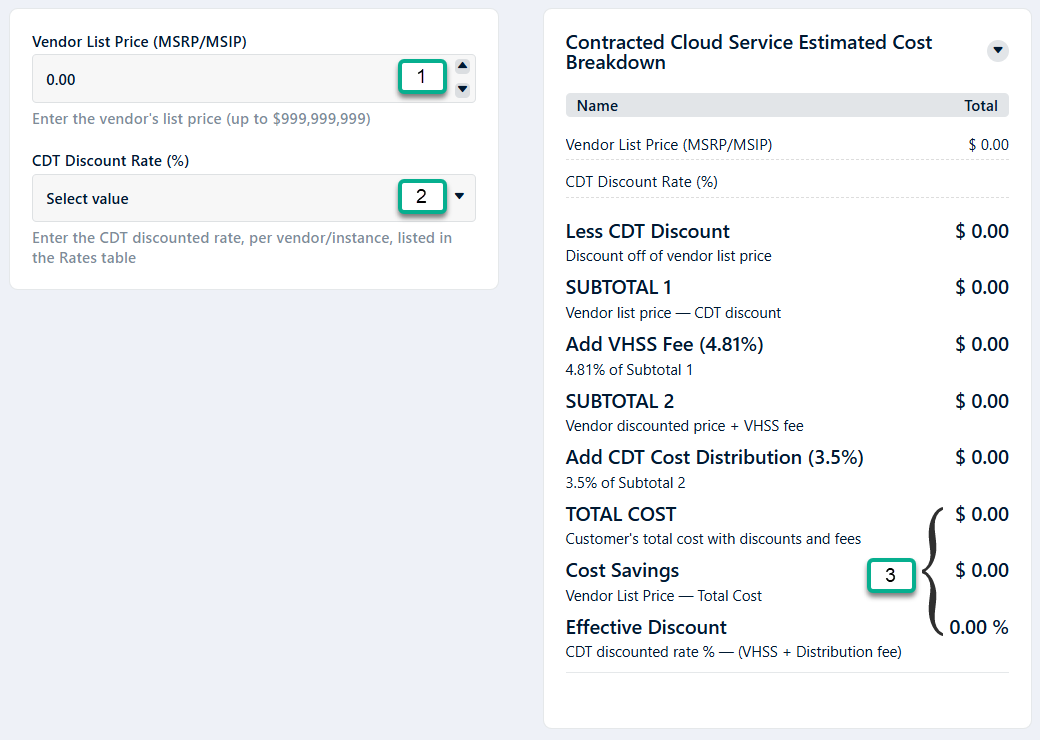
Estimate your total cost for CDT’s Contracted Cloud Services by using our CDT Contracted Cloud Service Cost Planner. Reference the Rates table when following the instructions below.
NOTE: Estimates generated by this calculator are for informational purposes only. This calculator provides estimated pricing for planning purposes only. Final charges are subject to change and may vary from the estimate due to service usage, billing rules and/or timing. Customers should refer to their official invoice for actual billed amounts.
CDT Cost Planner Instructions
- Enter the vendor list price
Use the provider’s MSRP/MSIP amount (before any discounts). - Select the CDT Discounted Rate %
Based on your selected cloud provider, FedRAMP level, and instance type, select the corresponding CDT Discounted Rate %. - Review your results
The tool will automatically:- Apply the CDT discount rate,
- Add VHSS and CDT Distribution fees, and
- Show your estimated total cost, cost savings, and net discount rate.
Request service
Start by contacting your CDT Account Lead to schedule a brief discovery meeting with our experts to understand your business and technical needs.
| Step | What you do | How / Where |
|---|---|---|
| 1 | Start discovery session | Contact your CDT Account Lead to schedule a collaborative conversation with a CDT expert about your goals, constraints, and priorities to identify the right path forward. |
| 2a | Complete California Cloud Services Assessment (CCSA) |
|
| 2b | Access SAFE Account |
|
| 3a | Submit CDT Contracted Cloud Services request | Log into CDT’s IT Services Portal & submit a CDT Contracted Cloud Services Case/Request (also known as Off-Premises Cloud Services). |
| 3b | Acquire CCSA Exemption Approval | If your CCSA is approved, your cloud account will be created. The cloud account information (Service Key/Account ID) is required to submit a Cloud Provider Interconnect (CPI) Case/Request. |
| 4 | Request a New Network Design/Cost Estimate for CPI | Upon notification your cloud account has been created, submit a New Network Design/Cost Estimate for Cloud Provider Interconnect (CPI) Case/Request. |
| 5 | Submit Cloud Provider Interconnect (CPI) Service request | Establish a CPI network connection (if required*) by attaching your Network Design/Cost Estimate for CPI to a Cloud Provider Interconnect (CPI) Case/Request. |
FAQs
1. What is the California Cloud Services Assessment?
CDT has developed an update to the Cloud Computing Policy (TL 23-03), now called Cloud Smart. The policy leverages modern technology, frameworks, and practices created to deliver the full potential of cloud computing while driving digital transformation to achieve improved operational efficiency, agility, and innovation.To ensure alignment with the Cloud Smart Policy, CDT is conducting an assessment for state agencies planning to request new or additional accounts and services to commercial or government cloud services.Please visit the California Cloud Services Assessment (CCSA) web page for more information and instructions on how to successfully complete this process as part of the Off-Premises Cloud Services request.
2. How do I inquire about Contracted Cloud Services?
Customers interested in the Contracted Cloud Services can contact their CDT Account Lead for more information. The Account Lead will assist the customers in the request process.
3. Where do I find my Account Lead contact information?
To look up your Account Lead, please go to https://www.cdt.ca.gov/account-lead-lookup/. If you do not have an Account Lead at this time, call Customer Engagement at (916) 431-5390.
4. Do I need to include a Cost Estimate in the Request/Case?
There is no cost estimate required for this service. A committed budgetary amount is only for information. The customers will be charged for what they consume.
5. Can I move my existing Cloud account/subscription to Contracted Cloud Services offered via CDT?
Yes. Please contact your CDT Account Lead to schedule a brief discovery meeting with our experts to understand your business and technical needs.
6. Where can I find more information on the Cloud Providers and their services offered through CDT?
Please contact your CDT Account Lead to schedule a brief discovery meeting with our experts to understand your business and technical needs.
7. If I’m not sure which services to consume or which solutions are available for my system, who do I contact?
Please contact your CDT Account Lead to schedule a brief discovery meeting with our experts to understand your business and technical needs.
8. What do I need to consider before submitting a service request for Contracted Cloud Services?
Please contact your CDT Account Lead to schedule a brief discovery meeting with our experts to understand your business and technical needs.
9. Who needs to subscribe to Cloud Provider InterConnect (CPI)?
All cloud environments are accessed through CGEN CPI connections. Contact your CDT Account Lead to obtain assistance with the CPI service cost estimate or to have a brief discovery meeting to understand your business and technical needs. You may submit a case/request for CDT Contracted Cloud Services at the same time or prior to submitting the CPI Case/Request.
10. Where can I find the rates for Cloud Provider InterConnect (CPI) service?
The rates for CPI can be found under the Rates tab at https://cdt.ca.gov/services/cpi/.
11. How do I view billing information for the services consumed?
Your designated Billing Administrators will be given access to your Cloud Provider’s billing/usage tool to view current billing.
- AWS billing information
- CloudHealth at https://login.rackspace.com/login or by the SSO link.
- Azure billing information
- Azure Enterprise console at:
- https://portal.azure.com/ (Commercial / Moderate)
- https://portal.azure.us/ (High)
- Oracle billing information
- Oracle console at Home | Oracle Cloud Infrastructure
- Google billing information
- Google console at https://console.cloud.google.com/billing
- Azure Enterprise console at:
12. Who do I contact regarding the Billing process?
Please contact CDT Billing at Billing@state.ca.gov.
13. I would like to know more about the Cloud Provider InterConnect (CPI) service, how do I obtain further information?
For information on CPI visit https://cdt.ca.gov/services/cpi/. Additionally, contact your CDT Account Leads, who can provide detailed information or help obtain additional information from CDT Technical teams or the Cloud Service Providers. If you do not have an Account Lead at this time, contact Customer Engagement at (916) 431-5390.
14. Is CDT’s Private Marketplace available within CDT Contracted Cloud Services?
Yes. CDT’s Private Marketplace offers a curated catalog of software and services that operate within your cloud environment. It streamlines acquisition by allowing direct subscriptions from vendor marketplaces.